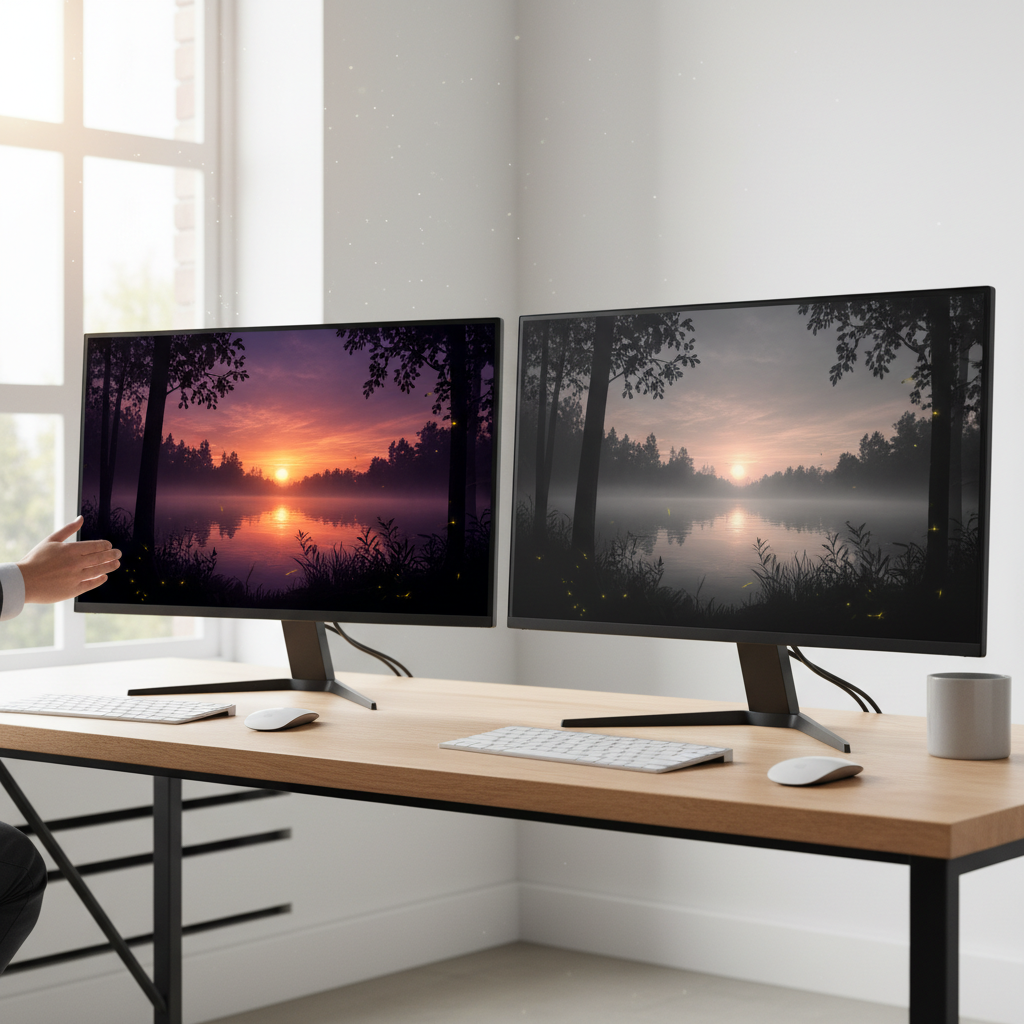
Have you ever found yourself gazing at a television or monitor, struck by the vibrancy and depth of the images, while other screens appear dull and washed out? The subtle yet profound difference often lies in a critical specification: the contrast ratio. This single number holds immense power in defining your visual experience, influencing everything from the richness of colors to the clarity of subtle details in both bright and shadowy scenes. In 2026, as display technology continues to evolve at a rapid pace, understanding contrast ratio is more crucial than ever for making informed decisions. This guide will demystify what contrast ratio truly means, distinguish between different types, explain its vital importance, and help you determine what constitutes a “good” contrast ratio for your specific needs.
What is Contrast Ratio?
At its core, contrast ratio quantifies the difference between the brightest white and the darkest black a display can produce. It is expressed as a ratio, such as 1000:1, meaning the brightest white is 1,000 times brighter than the darkest black. A higher ratio indicates a greater distinction between light and dark areas on the screen, resulting in images that boast enhanced depth, detail, and realism. This fundamental metric directly impacts how you perceive every element on your screen, from crisp text to the atmospheric mood of a cinematic landscape.
Native vs. Dynamic Contrast Ratio: Understanding the Difference
When evaluating displays, you will frequently encounter two distinct types of contrast ratio specifications: native (or static) and dynamic. Grasping the difference between these two is paramount, as one offers a reliable indicator of true performance, while the other can be significantly misleading.
Native (Static) Contrast Ratio
|
Our Picks for the Best Mini projector in 2026
As an Amazon Associate I earn from qualifying purchases.
|
||
| Num | Product | Action |
|---|---|---|
| 1 | 【Built-in APPS & Electric Focusing & 210° Rotation】Mini Projector With Wifi And Bluetooth, 1080P Portable Projector, Movie Projector for Bedroom, Supports Smartphones/TV Stick/iPad/PS5/Laptop/HDMI/USB |

|
| 2 | CiBest Mini Projector, Upgraded Full HD 1080P Support Video Projector, Portable Small Movie Projector, Compatible with iOS/Android/Windows/TV Stick/Box/USB/HDMI |
|
| 3 | HP Smart Mini Projector with WiFi and Bluetooth, Short Throw Projector, Native 1080P Full HD, Official Licensed Apps, Auto Focus & Keystone, Portable Movie Projector for Bedroom & Outdoor |
|
| 4 | [Built-in Apps] CLOKOWE Mini Projector with WiFi and Bluetooth, 2026 Upgraded 1080P Smart Portable Projector with 180° Rotation, Auto Keystone, Compatible with iPhone/Android/Laptop/TV Stick/HDMI/USB |
|
| 5 | Optoma 4K UHD Projector HDR High Brightness Home Theater DLP Technology White Compact Design Gaming Ready Streaming Bundle HDMI Cable CPS 12 Month Protection Plan Included |
|
| 6 | Mini Projector with WiFi 6 and Bluetooth 5.4 Built-in Apps for Bedroom Portable Projector Android 14 Smart Auto Keystone 1080P 4K Support Compatible with iOS/HDMI/TV Stick VisualCube 300 White |
|
| 7 | HAPPRUN Native 1080P Bluetooth Mini Projector, Full HD Portable Outdoor Movie Projector with Built-in Speaker, Compatible with Smartphone, HDMI, USB, AV, Fire Stick, PS5 for Home, Bedroom, Outdoor Use |
|
| 8 | Magcubic Mini Projector with WiFi 6 and Bluetooth 5.4, Portable Projector 4K Support, 5W Soundbase Speaker, Auto Vertical Keystone 180°Rotatable Smart Proyector for Movie Home Outdoor |
|
| 9 | Mini Projector with Wifi 6 and Bluetooth5.4, Portable Projector 4K Support, Android 14 Smart Proyector with 200ASIN & Auto Keystone, Alwtniet HY300Pro Small Proyector for Bedroom, Movie, Outdoor |
|
| 10 | Mini Projector, ELEPHAS Portable Projector for iPhone, 7000L with Synchronize Smartphone Screen, Movie Projector with 1080P HD/200 Screen Support, Compatible with Android/iOS/TV Stick/HDMI/USB/SD |
|
This is the only number you should primarily consider. Native contrast ratio measures the brightness difference between the brightest white and the darkest black that a display can render simultaneously within the same frame and under consistent power conditions. It reflects the inherent capability of the display panel itself, representing its true, consistent performance in any given scene. A high native contrast ratio ensures deep blacks and bright whites appear side-by-side without compromise, delivering a consistently rich and detailed image.
Dynamic Contrast Ratio
Dynamic contrast ratio, conversely, is a much higher, often exaggerated figure. It measures the difference between the brightest white a display can achieve in its brightest setting (often across an entirely white screen or scene) and the darkest black it can produce in its dimmest setting (potentially an entirely black screen or a very dark scene). This is achieved by actively adjusting the backlight or light source intensity in response to the overall brightness of the content being displayed. While a high dynamic contrast ratio might look impressive on a spec sheet, it often does not reflect real-world viewing. These fluctuations can lead to noticeable “pumping” artifacts, where the overall screen brightness subtly changes, and can even hinder the precise tone mapping required for High Dynamic Range (HDR) content. For accurate and stable image quality, especially in tasks like photo editing or for an immersive cinematic experience, a strong native contrast ratio is far more valuable.
Why Contrast Ratio is Critical for Your Viewing Experience
The importance of a robust contrast ratio extends far beyond mere numbers; it fundamentally shapes the quality of your visual experience.
- Enhanced Clarity and Detail: A high contrast ratio allows displays to render subtle gradations between light and shadow more effectively. This means you can discern fine details in both the brightest highlights and the deepest, darkest parts of an image that might otherwise be lost on a display with lower contrast.
- Vibrant Colors and Depth: While not directly a color metric, superior contrast makes colors appear more vibrant and lifelike. When blacks are truly black, and whites are truly bright, the colors in between gain a palpable sense of depth and pop, transforming flat images into immersive visuals.
- Immersive Viewing: For activities like watching movies, playing video games, or engaging with high-quality photographs, a high contrast ratio creates a more engaging and immersive experience. The greater distinction between light and dark elements draws you deeper into the content, making visuals feel more realistic and impactful.
How Contrast Ratio is Measured
Measuring contrast ratio involves a straightforward process, though the intricacies can vary slightly depending on the display type and the standards being followed. Generally, it’s calculated by dividing the luminance (brightness) of the brightest white a display can produce by the luminance of its darkest black.
Luminance is typically measured in candelas per square meter (cd/m²) or “nits.” Professionals use specialized tools, such as a light meter or a spectroradiometer, to measure the light output from specific test patterns displayed on the screen. The goal for the darkest black is a luminance value as close to zero as possible. The resulting ratio provides a numerical value for the display’s contrast performance.
Another important measurement, particularly for projectors, is ANSI Contrast. This method uses a checkerboard pattern of alternating black and white squares to measure contrast in a mixed scene. Unlike on/off (sequential) contrast, which can be easily manipulated, ANSI contrast provides a more realistic assessment of a display’s ability to render contrast when both bright and dark elements are present simultaneously.
What Constitutes a Good Contrast Ratio in 2026?
Defining a “good” contrast ratio is nuanced, as the ideal number depends heavily on the display technology, your intended use, and the viewing environment. Here’s a breakdown for different display types and applications in 2026:
| Display Technology / Use Case | Good Native Contrast Ratio | Notes |
|---|---|---|
| IPS Panel Monitors | ~1000:1 | Standard for general use and office work, offering good color consistency. Anything significantly below 1000:1 may appear washed out. |
| VA Panel Monitors | 2500:1 – 6000:1 | Known for excellent black levels and high contrast. Ideal for media consumption, gaming, and home theater use. Some premium models push beyond 6000:1. |
| OLED Displays (TVs/Monitors) | Effectively Infinite (∞:1) | The gold standard. Each pixel is self-emissive and can turn off completely, yielding perfect blacks. Delivers unparalleled image depth and quality. |
| Home Theater (TVs/Monitors) | 3000:1 – 5000:1+ | For immersive movie nights and casual gaming, higher is better. A 5000:1 or higher contrast ratio is highly recommended for HDR content to fully appreciate its dynamic range, with top-tier displays reaching 10000:1 or more. |
| Projectors (Home Theater) | 2000:1+ (good) | A contrast ratio of at least 2000:1 is considered good for home theater projectors. For very good to excellent performance, aim for 3000:1 to 5000:1 or higher. Premium models, especially from brands like JVC, can boast native contrast ratios of 40,000:1 or even more, offering exceptionally deep black levels. |
| Projectors (Business/Education) | 500:1 – 2000:1 | In environments with ambient light, where the focus is on clear text and graphical data rather than cinematic visuals, a range of 500:1 to 2000:1 is often sufficient. |
| Professional Photo/Video Editing | 5000:1+ | For tasks requiring precise detail in dark and bright areas, such as color grading or intricate design work, a contrast ratio of 5000:1 or higher is ideal. Prioritizing color accuracy and gamut coverage is also crucial. |
| Gaming (Monitors/TVs) | 2000:1+ | High contrast helps distinguish enemies from backgrounds and makes dark scenes navigable. For competitive gaming, 2000:1 is a good starting point. For immersive AAA games and HDR content, a VA panel (3000:1+) or OLED (Infinite) is transformative. |
Factors Influencing Perceived Contrast
While the native contrast ratio of a display panel is a fixed specification, the perceived contrast can be influenced by several external and internal factors.
Display Technology
Different display technologies inherently offer varying levels of native contrast. OLED displays lead the pack with their self-emissive pixels, allowing for perfect blacks and infinite contrast. VA (Vertical Alignment) LCD panels typically offer superior contrast to IPS (In-Plane Switching) panels, which are known for wider viewing angles and color accuracy but generally lower black levels. LED and QLED displays, which rely on backlights, can achieve improved contrast through local dimming, where sections of the backlight are selectively dimmed or turned off.
Ambient Light
The viewing environment plays a significant role. Strong ambient light, whether from windows or artificial room lighting, can reflect off the screen, making dark areas appear lighter and effectively reducing the perceived contrast. A display with a high contrast ratio will maintain clarity better in brighter rooms, but controlling ambient light is always beneficial for optimal viewing.
Screen Coatings and Material
The surface treatment of a screen (matte vs. glossy) and, for projectors, the screen material itself, impact reflections and perceived contrast. Matte coatings help reduce glare, which can otherwise wash out an image. For projectors, an Ambient Light Rejecting (ALR) screen can dramatically improve black levels and overall contrast by deflecting room light away from the viewer.
Display Calibration and Settings
Out-of-the-box factory settings may not always be optimized for the best contrast. Proper calibration, including adjusting brightness, contrast, and color settings, ensures the display renders images with the most accurate and impactful contrast possible. Incorrect settings can lead to washed-out or overly dark visuals.
Local Dimming
Many LED-backlit TVs and some monitors feature local dimming technology. Full-Array Local Dimming (FALD) systems divide the screen into many zones, each of which can have its backlight dimmed or brightened independently. This significantly enhances the effective contrast ratio by allowing for deeper blacks in dark areas of the screen while bright areas remain vibrant. However, the number of dimming zones and the quality of the algorithm can vary widely, affecting overall performance.
Optimizing Your Display for the Best Contrast
Achieving the best possible contrast from your display involves a combination of smart purchasing and thoughtful setup.
- Choose the Right Display for Your Environment: If you primarily watch content in a dark room, a display with a high native contrast (like a VA panel or, ideally, an OLED) will be transformative. For brightly lit rooms, a display with good brightness and effective anti-glare coatings, alongside a decent contrast ratio, is important.
- Control Ambient Light: For critical viewing, minimizing ambient light is key. Dim lights, draw curtains, or use blackout blinds to prevent reflections and maintain deeper black levels.
- Calibrate Your Display: Even a slight adjustment can make a big difference. Many modern displays offer various picture modes; start with a “Cinema” or “Custom” mode and adjust brightness and contrast levels using calibration patterns or professional services.
- Consider ALR Screens for Projectors: If you use a projector in a room with some ambient light, an ALR screen can dramatically improve the perceived black levels and overall image punch, making your projected image look far more vibrant.
- Avoid Misleading “Enhancements”: Generally, it’s advisable to disable “Dynamic Contrast Ratio” settings on monitors or TVs if your goal is accurate image reproduction. These features, while promising higher numbers, often interfere with the stable brightness levels needed for a consistent and true-to-source picture, especially for HDR content.
Buying Guide: Making an Informed Decision
Navigating the world of display specifications can be daunting, but focusing on contrast ratio can simplify your choice.
- Define Your Primary Use Case: Are you a competitive gamer, a movie enthusiast, a professional editor, or simply looking for a versatile family TV? Your answer will guide the ideal contrast ratio.
- Assess Your Viewing Environment: Do you have a dedicated, light-controlled home theater, or will the display be in a bright living room? This significantly impacts how much contrast you’ll perceive.
- Prioritize Native Contrast: Always look for the native or static contrast ratio. If a manufacturer only advertises an astronomical dynamic contrast ratio, proceed with caution.
- Research Panel Technology: Understand that OLED offers infinite contrast, VA panels offer excellent contrast among LCDs, and IPS panels prioritize color accuracy and viewing angles with decent, but usually lower, contrast.
- Read Reputable Reviews: Independent reviews often provide measured native contrast ratios and real-world performance assessments, cutting through marketing hype.
Conclusion
Contrast ratio is not just another technical specification; it is the backbone of image quality, directly impacting the depth, realism, and immersion of your visual content. As we move through 2026, the spectrum of what constitutes a “good” contrast ratio continues to broaden, influenced by revolutionary technologies like OLED and advancements in local dimming. While specific numbers vary across display types and applications, prioritizing a high native contrast ratio will consistently lead to a more compelling and satisfying viewing experience. By understanding these nuances and considering your specific needs, you are well-equipped to choose a display that brings your content to life with unparalleled visual fidelity. What aspect of display quality do you find most impactful in your daily viewing?
Frequently Asked Questions
Is a higher contrast ratio always better?
Generally, yes, a higher native contrast ratio is better, as it allows for a greater distinction between the brightest whites and darkest blacks, enhancing image depth and detail. However, extremely high dynamic contrast ratios can be misleading and may not reflect real-world performance, sometimes even introducing visual artifacts.
Does ambient light affect perceived contrast ratio?
Absolutely. Ambient light can significantly reduce the perceived contrast ratio by reflecting off the screen surface and making black levels appear brighter or washed out. Viewing a display in a dark room allows its true native contrast capabilities to shine through.
Should I enable dynamic contrast ratio on my display?
For the most accurate and consistent picture quality, especially for critical viewing or HDR content, it is generally recommended to keep dynamic contrast ratio settings off. While it can produce higher numbers, it often leads to distracting brightness fluctuations and can interfere with the content creator’s intended image.
What’s a good contrast ratio for gaming?
For gaming, a good contrast ratio starts around 2000:1, allowing you to clearly distinguish elements in shadows and highlights. For highly immersive AAA games, particularly those supporting HDR, a display with a native contrast ratio of 3000:1 or higher (such as VA panels or OLEDs) will offer a significantly more engaging and detailed experience.
How do OLED displays achieve infinite contrast?
OLED displays achieve effectively infinite contrast because each individual pixel is self-emissive and can be turned off completely. When a pixel is off, it emits no light, resulting in a perfect black. Since the luminance of the darkest black is zero, the division of any white luminance by zero results in an infinite contrast ratio.